How to Automate TikTok Slideshows with AI
 ReelFarm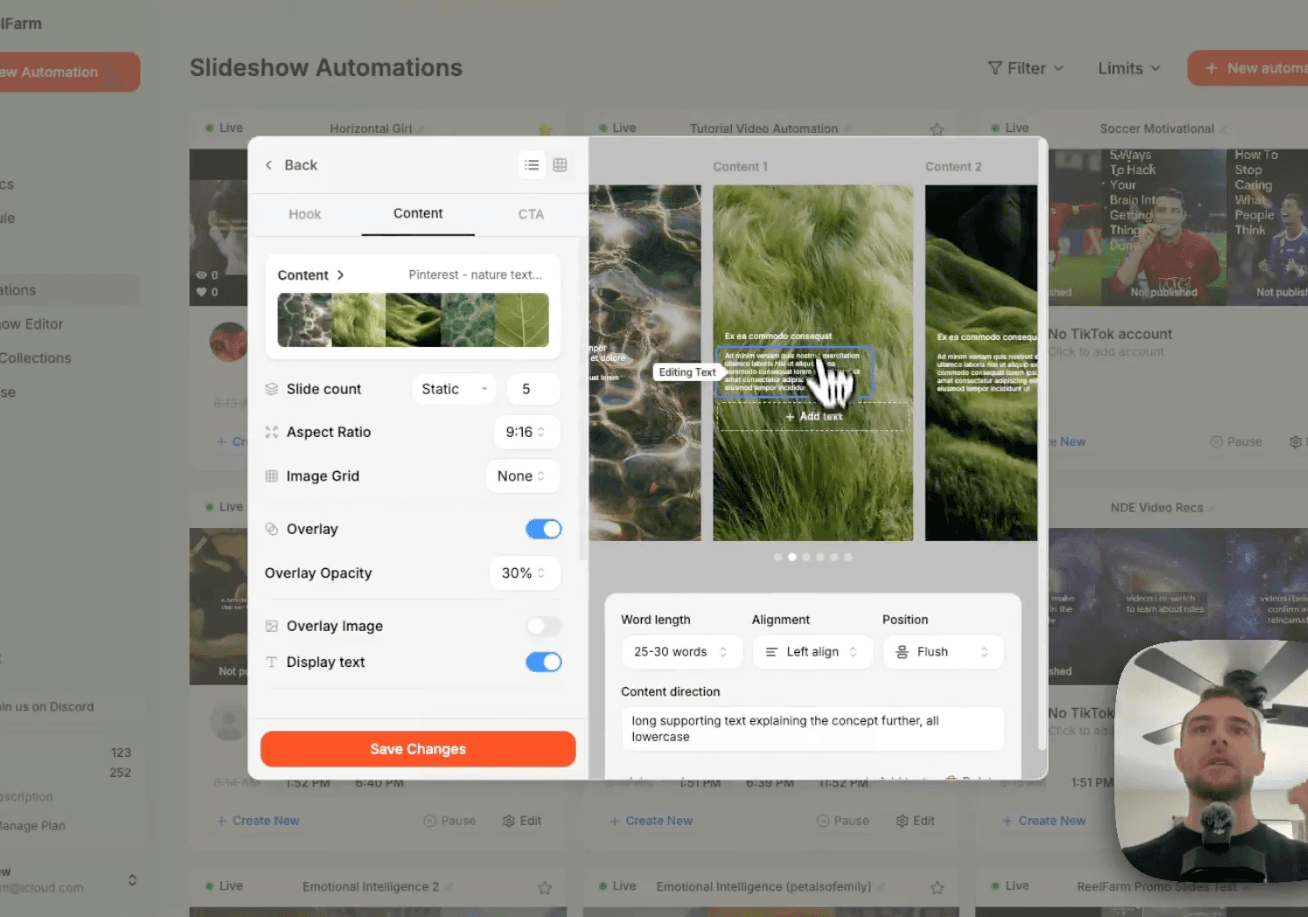
To automate TikTok slideshows with AI, you do three things:
- Find a slideshow page on TikTok with a repeatable format
- Build an image collection that matches its aesthetic
- Recreate the format as an automation in ReelFarm
Setup takes about 5 minutes, and you never have to leave ReelFarm. This guide walks through the entire process, step by step, using a real slideshow page as an example.
What is TikTok Slideshow Automation?
TikTok slideshow automation means using AI to generate image-carousel posts (the swipeable photo posts you see on TikTok) and publish them to your account on a schedule, without manually designing slides, writing captions, or posting by hand.
Slideshows are the easiest TikTok format to automate because every slideshow is really just a list: a hook on the first slide, supporting points on the slides after it.
AI is very good at generating lists. That's why slideshows are the most versatile viral format on TikTok, they work for literally any niche, and viewers engage with them (saves, shares, comments) without ever realizing they're AI-generated.


A hook slide (left) and body slide (right) from the example page, note the two text items on each

ReelFarm is the best tool to automate faceless TikToks to drive traffic to your website.
Try for freeStep 1: Find a Slideshow Format Worth Copying
Open TikTok and scroll until you see a slideshow performing well. Tap through to the account posting it. What you're looking for is a repeatable format, a page where every post follows the same visual and structural pattern.
Every TikTok slideshow is built from three types of slides. The hook slide is always the first slide, it's the reason someone stops scrolling (e.g. "how to romanticize your own solitude"). The body slides are all the slides after it, the actual content, usually a list (e.g. "rule one: create your own sacred spaces"). And sometimes there's a CTA slide at the end pointing to a product or link (e.g. "full guide in bio").
Many successful pages skip the CTA slide entirely, so don't worry if the page you're modeling only has hooks and body slides.
Now study what repeats across every post on the page. How many text items are on each slide? (In our example: two on the hook slide, a main hook plus smaller supplemental text underneath.) How is the text styled? (White text, small font, left-aligned, all lowercase.) What kind of images are they using? (Paintings, nature shots, textures, a consistent aesthetic.)
That's your blueprint. Everything from here is just recreating it.
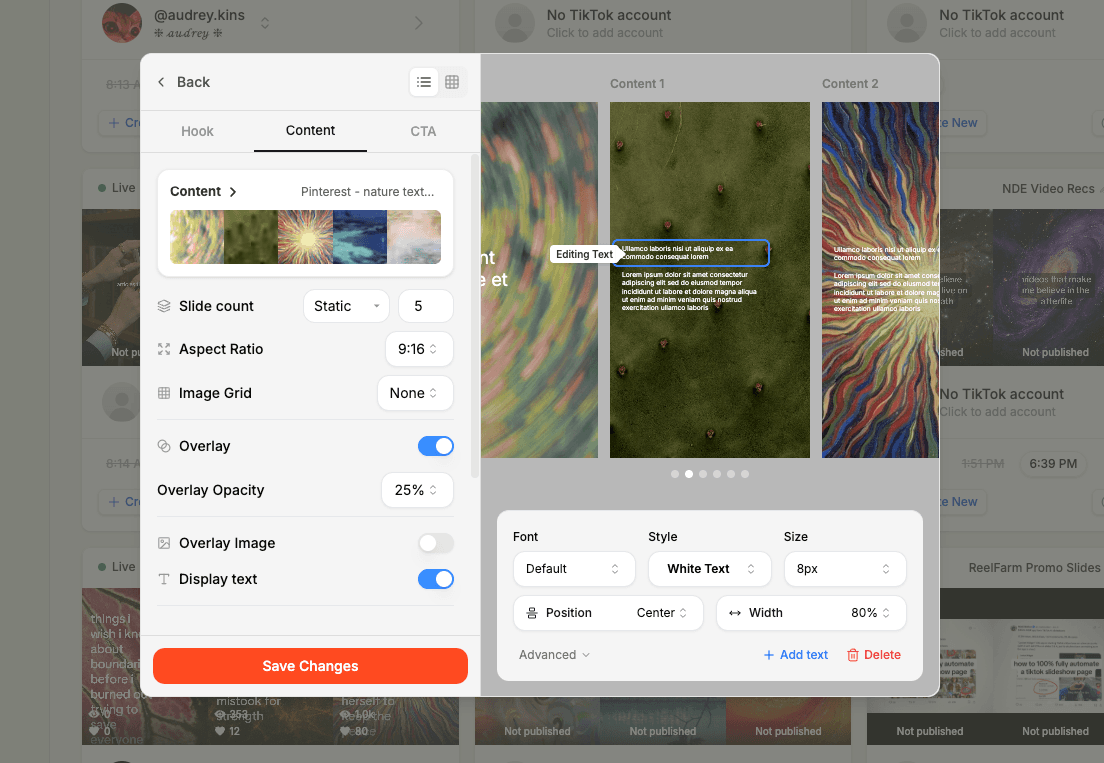
Editing a body slide from a TikTok slideshow format in ReelFarm
Step 2: Build Your Image Collection
The images are the backbone of the aesthetic, and you don't need to leave ReelFarm to get them.
In your ReelFarm dashboard, go to Image Collections. You have two options: upload images from your desktop, or click "Add" to search Pinterest directly inside ReelFarm. Think of a search query that matches the aesthetic of the page you're modeling. For a page using paintings and nature textures, something like "nature textures" works.
Browse the results and select only the images that fit, you don't have to use everything Pinterest gives you. Clear the selection and hand-pick. Around 9-15 images is plenty to start. Then click "Create Collection".
ReelFarm pulls those images from Pinterest into your account automatically, no downloading files to your computer and re-uploading them one by one. Refresh the page and your collection is ready.
Tip: Pinterest and Tumblr are the best image sources because boards and blogs naturally group photos with the same aesthetic. Search keywords in your niche and the visual consistency takes care of itself.
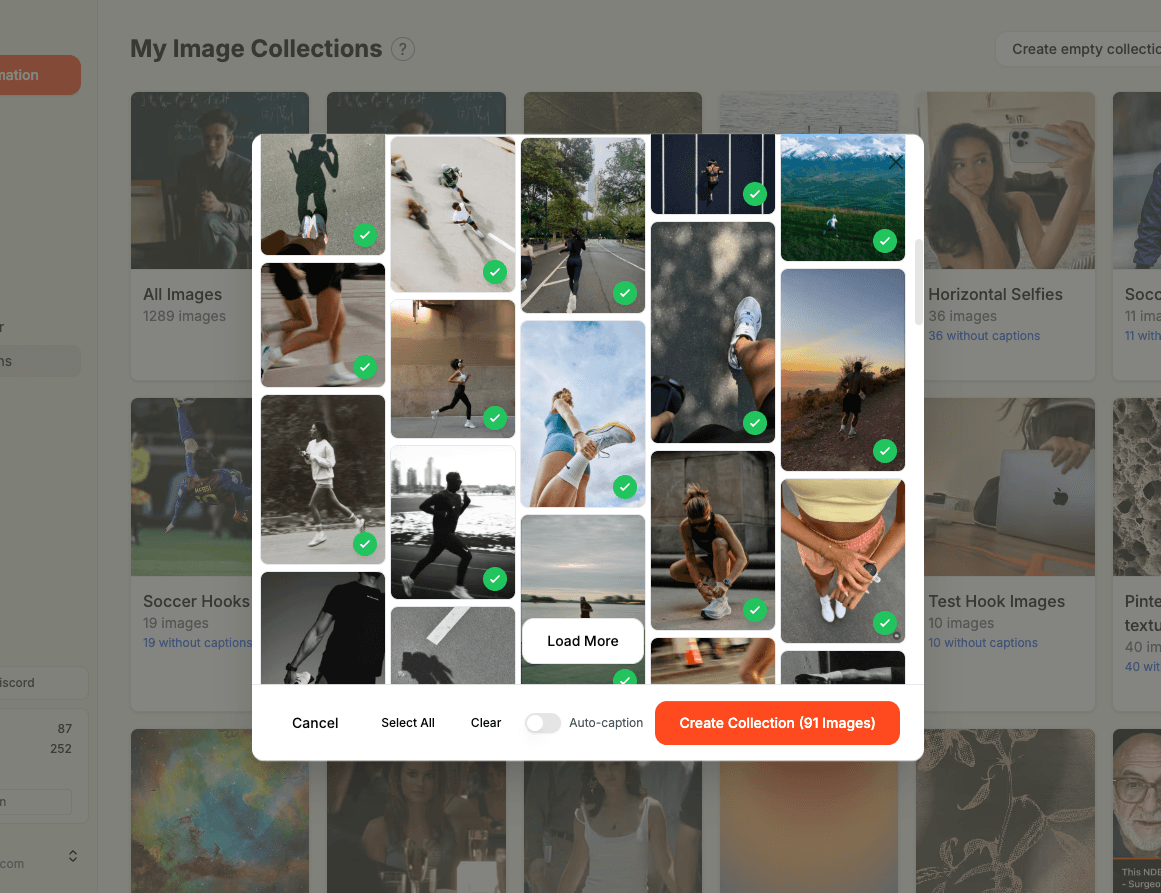
Searching Pinterest from inside ReelFarm and selecting images for a collection
Step 3: Create the Automation and Set Your Images
Go to "New Automation" in ReelFarm. You'll see a library of pre-built slideshow templates here (more on those below). Click "Create" to start from a blank automation.
Set the hook collection (the images used behind your hook slides) to the collection you just created. Then set the content collection (the images behind your body slides). The same collection works fine for both.
You could technically generate slideshows right now, but they wouldn't match the format you're copying yet. The styling and content direction are what make the output look indistinguishable from the page you modeled.
Step 4: Style the Hook Slide Text
Recreate the two text items from your blueprint. For the first text item (the hook): set the color to white, font size to about 10 pixels, and under Advanced, change the alignment from center to left-aligned with the position set to flush.
Why flush matters: if you set the width to 80% but leave the position padded, the text still hovers near the center of the slide. Flush + left-aligned pins the text against the left edge, that's how you get that clean, editorial look you see on the pages you're copying.
Then add a second text item (the supplemental text): same settings, white, left-aligned, flush, but drop the font size to 8 pixels so it sits visually beneath the hook.
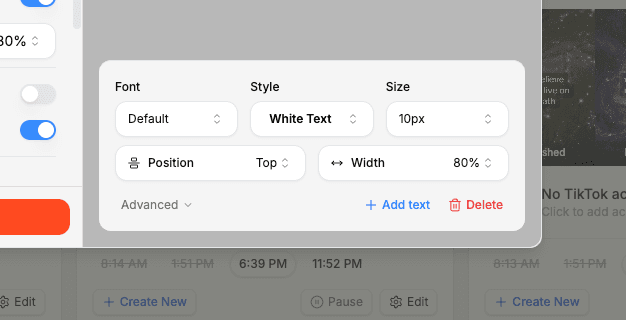
Text item settings: white text, small font size, left-aligned, flush
Step 5: Write the Content Direction Prompts
Content direction is how you tell the AI what each text item should say. Keep these short and directive, and include examples, the AI picks up the pattern from them.
For the hook text item, something as simple as "hook text, all lowercase" works. For the supplemental text item: "supplemental text, small text that relates to the hook, all lowercase" followed by examples like "my guide to emotional detachment", "becoming untouchable on purpose", or "my guide to becoming yourself".
The fastest way to write good examples? Pull them straight from the page you're modeling. They've already proven the pattern works.
Step 6: Style and Prompt the Body Slides
Body slides carry the actual content, so the text runs longer. Style both body text items the same way: white, left-aligned, flush, with the heading at 10 pixels and the supporting text at 8 pixels. Set the width to around 80% so longer text has room to breathe.
Set the word length for the supporting text to roughly 25-30 words, body content is the meat of the slideshow, so give it space.
For the heading's content direction, try: "heading title, about 10 words, on a topic related to the hook, all lowercase" with examples like "rule one: [topic]" and "rule two: [topic]". For the supporting text: "long supporting text explaining the concept further, all lowercase".
Want a different structure? The examples steer everything. Prompting with "rule one / rule two" gives you a numbered-rules format. Remove the examples and you might get a plain listicle. Add "this is not a list item" if you want freeform text instead. Steer with examples, not long instructions.
Step 7: Add an Overlay So the Text Pops
Notice how on good slideshow pages the text is always brighter than the background? That's a dark overlay sitting between the image and the text. In the left sidebar, turn on the overlay for both the hook slides and the body slides and set it to 30%. Instantly more legible, and much closer to the look you're copying.
While you're here, set your slide count, 5 slides is a solid default.
Step 8: Add Your Hooks and Create the Automation
Click "Create Automation". Two settings worth touching now (everything else can be changed later). First, tone & styling: "Conversational and relatable" is the easiest starting point. Second, slideshow hooks: one hook per line, and again, steal directly from the page you're modeling.
From our example page: "how to romanticize your own solitude", "things people who grew up emotionally alone will understand", "the beauty of learning to let go", "how i stopped letting the world decide how i feel", "how to stop being your own worst enemy". Add as many as you want, each hook becomes a future slideshow.
Don't overthink this step. Nothing is locked in, you can change the hooks, images, narrative, styling, and schedule any time after the automation is created.
Step 9: Generate and Review Your Slideshows
Click "Generate". In about 30 seconds, ReelFarm takes your first hook, writes the supplemental text and body content based on your content directions, pairs everything with images from your collections, and assembles the slideshow.
From the example in this guide, the very first generation produced: "how to romanticize your own solitude / my guide to loving alone time" as the hook slide, then "rule one: create your own sacred spaces", "rule two: romanticize the mundane tasks", "rule three: build rituals just for yourself" as the body slides. Side by side with the original page we modeled, it's nearly identical, same styling, same structure, same voice.
The output won't be rigid, either. Text length and topics vary naturally between generations, so your page doesn't look templated.
And anything can be adjusted and regenerated. Switching the aspect ratio from 9:16 to 4:5 and moving the text to the top of the slide takes two clicks, save, generate, done.

A generated ReelFarm slideshow (left) next to the original TikTok page it was modeled on (right)
ReelFarm is the best tool to automate faceless TikToks to drive traffic to your website.
Try for freeThe Shortcut: Start from a Template Instead
If building from scratch feels like a lot, ReelFarm's slideshow library has pre-built automation templates where the styling, prompts, and format are already done. Add one to your account, then swap in your own hooks, images, and narrative.
Templates are also the best way to learn how good automations are structured, open one up and reverse-engineer the content directions. Building from scratch takes about 5-10 minutes and is best for copying a specific page's format exactly. Starting from a template takes about 2 minutes and is best for getting started fast in a proven format.
Frequently Asked Questions
Why slideshows instead of regular videos?
Slideshows are the most versatile and easiest format to automate while still being genuinely engaging. At their core, every slideshow is an ordered or unordered list, so any hook that can be framed as a list ("5 habits…", "7 ways…", "what I learned…") becomes a slideshow. They're evergreen, they get saved and shared, and viewers can't tell they're AI-generated.
How often should I post automated slideshows?
Start with 1-2 posts per day for the first 1-2 weeks. If your videos are getting consistent reach after two weeks, you can move to 1-3 per day. Consistency beats volume, TikTok rewards an account that posts once a day reliably over one that posts three times a day sporadically.
Do I need to warm up my TikTok account first?
If the account is brand new or hasn't been used in a while, yes. Spend 20-30 minutes a day scrolling and engaging with content in your niche for 3-7 days before posting anything. Then keep engaging daily even after you start posting, TikTok needs to see a real human using the platform, not a posting bot.
Where do the images come from? Is that allowed?
You source them yourself, Pinterest (searchable directly inside ReelFarm), Tumblr, or your own uploads. For organic posts this is standard practice across slideshow pages. The one hard rule: if you ever want to run paid ads with a slideshow, you must own the rights to the images.
Can I use these slideshows to sell my product?
Yes, two ways. A soft sell mentions your product casually inside the content (one of your "5 tools" is your product) without it ever feeling like an ad. A CTA is explicit: "link in bio". Soft selling tends to convert well with slideshows because the viewer feels like they discovered the product themselves.
Can I post these slideshows anywhere besides TikTok?
Yes. Slideshows are image carousels, so they repurpose directly to Instagram, LinkedIn, and any other platform that supports carousel posts.
How many TikTok accounts can I run with ReelFarm?
Unlimited. You can connect as many TikTok accounts as you want and run separate automations for each.
Final Thoughts
The whole workflow comes down to pattern recognition: find a slideshow page that works, break it into its repeatable parts (hook slides, body slides, text styling, image aesthetic), and recreate those parts as an automation. Once it's set up, ReelFarm generates new slideshows from your hooks on its own, and a 5-minute setup turns into an entire automated TikTok page.
ReelFarm is the best tool to automate faceless TikToks to drive traffic to your website.
Try for free